
Authorized Integrations
Authorized Integrations provide a capability for API requests to Forgejo to be authenticated based upon a JSON Web Token (JWT) generated and signed by an external system. Examples of compatible systems include: Forgejo Actions (on the same, or a different, Forgejo instance), GitHub Actions, GitLab CI/CD, and Amazon Web Services. Any system that meets Forgejo’s technical requirements is compatible.
Authorized Integrations do not use any static long-lived credentials, which makes them easier to manage and secure than Access Tokens. Instead, JWTs are created that can have a short expiry, and their validity can be checked against signing keys that can be rotated without service discontinuity. Authorized Integrations are preferred over using Access Tokens whenever possible in a supported system.
Users can configure Authorized Integrations by visiting their Settings page, and selecting the Authorized Integrations menu item. From there, a user can create a new Authorized Integration, edit an existing Authorized Integration, or delete Authorized Integrations.
Creating a new Authorized Integration requires selecting the type of system to integrate with. Integrating with Forgejo Actions (Local) provides a simple user interface for allowing a workflow running on this Forgejo instance to access resources. Any other system that meets Forgejo’s technical requirements for generating JWTs can access Forgejo using the Generic JWT option.
All Authorized Integrations have three sections: identifying information for the Authorized Integration, validating information for what access is permitted from the third-party system, and what capabilities are granted to the Authorized Integration.
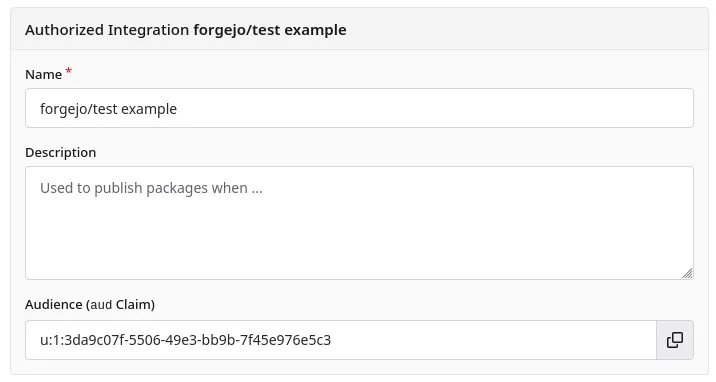
In the identifying information section pictured above, three fields are provided:
- A Name used for the Authorized Integration list
- A Description which can be used to take notes on the Authorized Integration
- An Audience which is a unique identifier for the Authorized Integration, and must be used in the external system when generating a JWT. This is not a confidential, secret value.
- Audience is not visible until an Authorized Integration is saved for the first time.
- This value is the
audJWT claim, which is generated by Forgejo, and must be included by the external system in the JWT to identify it.
Forgejo Actions (Local)
A Forgejo Actions (Local) Authorized Integration can be used when a Forgejo Action needs to access resources on the same Forgejo instance. Forgejo Actions provides an automatic ${{ forgejo.token }}; however, this token has limited capabilities. Authorized Integrations allow Forgejo Actions to extend their reach into operations that are not permitted by the automatic token.
To use this capability, first create an Authorized Integration. In the “Forgejo Actions (Local)” section, restrictions are provided:
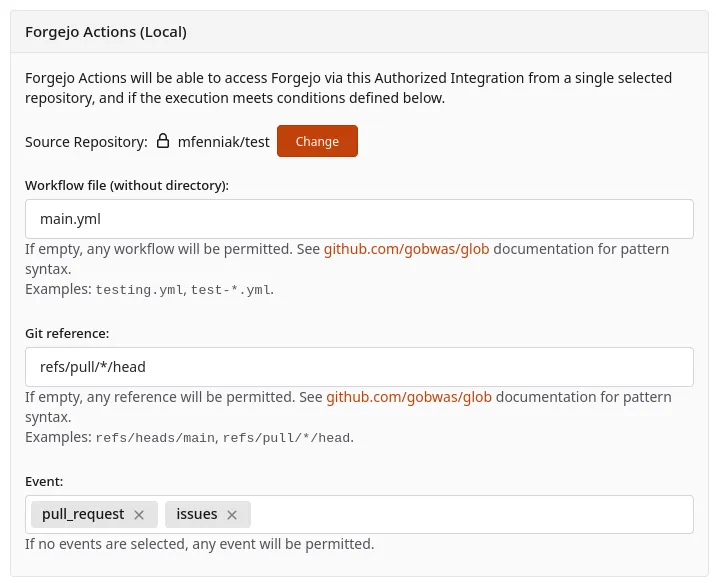
- Source Repository: Only workflows executing in this repository will be able to use this Authorized Integration. A repository must be selected.
- If the repository is transferred to a new owner, the Authorized Integration will need to be edited and the repository selected again.
- Workflow file (without directory): A file name, such as
testing.yml, which matches the workflow that you want to permit using this Authorized Integration.- Must not include the path of the file.
- Can contain wildcards, such as
test-*.yml. - Can be empty to allow any workflow in the repository.
- Git reference: Git reference where authorized Actions would be running, such as
refs/heads/main.- Can contain wildcards, such as
refs/tags/v1.*. - Can be empty to allow any reference.
- Can contain wildcards, such as
- Event: Only enable the Authorized Integration when the workflow was triggered by one of the selected events. For example, an Authorized Integration with the
scheduleevent would only be enabled if a workflow was runon: schedule: {...}.- Can be empty to allow for any event.
Once an Authorized Integration is created, these steps are taken to use it:
- Set
enable-openid-connect: truein the Workflow file to enable the generation of a JWT. - Make an HTTP call to Forgejo to generate a JWT, providing the
audiencevalue of your Authorized Integration. - Interact with Forgejo’s APIs, package registry, and Git operations with the JWT using HTTP Bearer authorization (HTTP header
Authorization: Bearer [...jwt...]).
The example Forgejo Actions workflow below is annotated with these three steps:
on:
  issues:
    types: [labeled]

# Step 1: Enable JWT generation:
enable-openid-connect: true

jobs:
  label-repeater:
    runs-on: docker
    steps:
      - name: fetch jwt
        id: jwt
        env:
          # Step 2: Use the "Audience" value; in this example it
          # is separated out from the small script below,
          # but it can be placed inline as well.
          # Safe to commit to public code -- not confidential.
          AUD: u:1:f92855c4-d9b2-40e2-a136-432b16bb7a78
        # Step 2: HTTP request to Forgejo. This script uses `curl`
        # and `jq` and assumes they are available, but any HTTP
        # client can be used.
        run: |
          jwt=$( \
            curl --fail \
            -H "Authorization: bearer $ACTIONS_ID_TOKEN_REQUEST_TOKEN" \
            "$ACTIONS_ID_TOKEN_REQUEST_URL&audience=$AUD" \
            | jq -r ".value" \
          )
          # ::add-mask:: tells Forgejo Runner that the JWT
          # is a secret which should be masked in the logs.
          echo "::add-mask::$jwt"
          echo "jwt=$jwt" >> $FORGEJO_OUTPUT
      # Step 3: Example here adds a new comment to an issue when it
      # is labeled.  `curl` and `jq` are used again to make a simple
      # HTTP request with bearer token authorization.
      - env:
          LABEL_NAME: ${{ forgejo.event.label.name }}
        run: |
          body=$(jq -n --arg label "$LABEL_NAME" '{body: "Label added: \($label)"}')
          curl \
            -v --fail \
            -H "Authorization: bearer ${{ steps.jwt.outputs.jwt }}" \
            -H "Content-Type: application/json" \
            -X POST \
            -d "$body" \
            "${{ forgejo.server_url }}/api/v1/repos/${{ forgejo.event.repository.full_name }}/issues/${{ forgejo.event.issue.number }}/comments"
A JWT generated by $ACTIONS_ID_TOKEN_REQUEST_URL has a fixed validity defined by the Forgejo server configuration value [actions].ID_TOKEN_EXPIRATION_TIME, which defaults to 1 hour. If a workflow is expected to run for an extended period of time, it is recommended that a new JWT is fetched at a regular interval which will have a renewed expiry time.
Retrieving a JWT from Forgejo will always be possible, as long as enable-openid-connect: true is specified in the workflow. If the JWT’s claims do not match the Authorized Integration’s configuration — for example, if it is generated from the wrong repository, workflow file, git reference, or event — operations that require authenticating to Forgejo will fail even if the JWT is successfully generated. In the example above, the fetch jwt step will always succeed, but the API interaction to Forgejo may fail.
Generic JWT
A Generic JWT Authorized Integration can be used with any external system that meets Forgejo’s technical details for generating a JWT. It provides direct access for a user to provide an issuer URL and a set of rules on how to validate a generated JWT.
The external system is responsible for generating a JWT and accessing Forgejo’s API. Forgejo will validate the JWT was authentically generated by the external system by validating its signature, and compare its claims against the flexible claim rules in the Authorized Integration, and then permit access to the API.
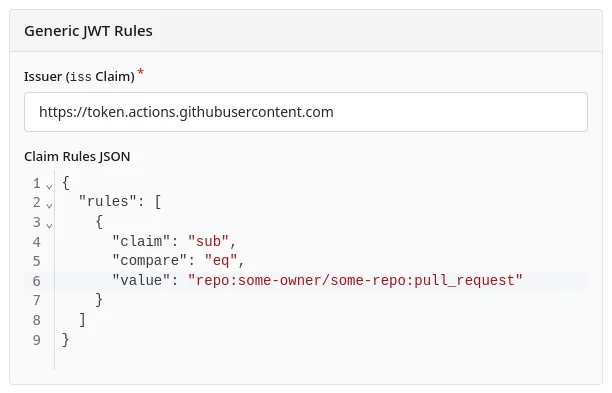
Issuer is the URL of the service that will be issuing a JWT.
- Must be an
httpsURL, which supports a subpath.well-known/openid-configurationJSON document (technical details). - Example:
https://codeberg.org/api/actionswould be used if Forgejo Actions, running on Codeberg, was being used to generate a JWT to access this Forgejo system. - Forgejo supports an internal URI
urn:forgejo:authorized-integrations:actions, which is treated the same ashttps://<this-instance>/api/actionsfor the current Forgejo host. 1
Claim Rules JSON is a JSON document with specific Claim Rules that will be validated against the JWT.
A JWT can have standardized claims that are defined in RFC 7519, such as the JWT’s expiration time (exp). Forgejo will automatically enforce logical restrictions on these standard JWT claims. However, with claims like a JWT’s Subject (sub), or custom claims that are provided by the external system, Forgejo relies on the Authorized Integration’s Claim Rules to define the required values for those claims.
At the root of the JSON document is an object with "rules", which is an array of rules. Each rule is a logical comparison between a "claim" and a value. The following values for "compare" operators are supported.
Single-value operators use "value" (singular) and list operators use "values" (plural).
"eq"- Compares the value of the
"claim"against the provided"value". Must be exactly equal. - Example:
{
  "claim": "sub",
  "compare": "eq",
  "value": "repo:some-owner/some-repo:pull_request"
}
- Compares the value of the
"in"- Compares the value of the
"claim"against any of the values in the list"values". Must be exactly equal to one of the values. - Example:
{
  "claim": "sub",
  "compare": "in",
  "values": ["repo:some-owner/some-repo:pull_request", "repo:some-owner/some-repo:ref:refs/heads/main"]
}
- Compares the value of the
"glob"- Compares the value of the
"claim"against the provided"value", with wildcard expansion. The"claim"must be a string, and the entire value must be matched by the"value". - Example:
{
  "claim": "sub",
  "compare": "glob",
  "value": "repo:some-owner/*:pull_request"
}
- Compares the value of the
"glob-in"- Compares the value of the
"claim"against the provided"values", with wildcard expansion. The"claim"must be a string, and the entire value must be matched by one of the"values". - Example:
{
  "claim": "sub",
  "compare": "glob-in",
  "values": ["repo:some-owner/*:pull_request", "repo:other-owner/*:pull_request"]
}
- Compares the value of the
"nest"- If the value of the
"claim"is an object, the fields within the object must match the rules provided by"nested". Multiple rules may be provided within the"nested"value, and all rules must match positively for the claim rule to be validated. - Example:
This rule would ensure that the{ "claim": "https://sts.amazonaws.com/", "compare": "nest", "nested": { "rules": [ { "claim": "aws_account", "compare": "eq", "value": "123456789012" } ] } }"aws_account"value was"123456789012"in a nested JWT claim value such as this:{ "aud": "u:1:f92855c4-d9b2-40e2-a136-432b16bb7a78", "sub": "arn:aws:iam::123456789012:role/MyRoleName", "iss": "https://sts.amazonaws.com/", // ... other claims ... "https://sts.amazonaws.com/": { "aws_account": "123456789012", "principal_id": "AROAXXXXXXXXXXXXXXXXX:session-name" // ... other claims ... } }
- If the value of the
Accessing a Remote Forgejo Instance in a Workflow
An Authorized Integration with Forgejo Actions (Local) is easier to use and configure and meets most people’s needs. This section is only relevant for remote access, or as an example for how a Generic JWT claim rule would work.
Forgejo Actions and Authorized Integrations can be configured so that a workflow running on one Forgejo can access resources on another Forgejo. As an example of a Generic JWT source, this would allow a workflow running on Codeberg to access a self-hosted Forgejo (forgejo.example.org):
-
On the self-hosted
forgejo.example.orgForgejo instance, create an Authorized Integration with the “Generic JWT” option. -
Enter a name and description.
-
In the “Issuer (
issClaim)” field, enter the Forgejo instance’s URL, plus/api/actions. In this case,https://codeberg.org/api/actions. -
Add claim rules by referencing Forgejo Action’s OIDC Custom Claims. For example:
{ "rules": [ { "claim": "repository_owner", "compare": "eq", "value": "some-owner" }, { "claim": "repository_name", "compare": "eq", "value": "some-repo" }, { "claim": "ref", "compare": "glob-in", "values": ["refs/tags/v*.*", "refs/heads/main"] } ] } -
Define the Capabilities to be granted by selecting permissions and resources.
-
Save the Authorized Integration, and copy the “Audience” field that is generated.
-
On Codeberg where the workflow will run, create a Forgejo Action that generates an OIDC token and makes API calls. Forgejo Actions (Local) has an example workflow with JWT generation.
- Insert the “Audience” field from the previous step into the workflow. It is not confidential, and can be committed to the repository publicly.
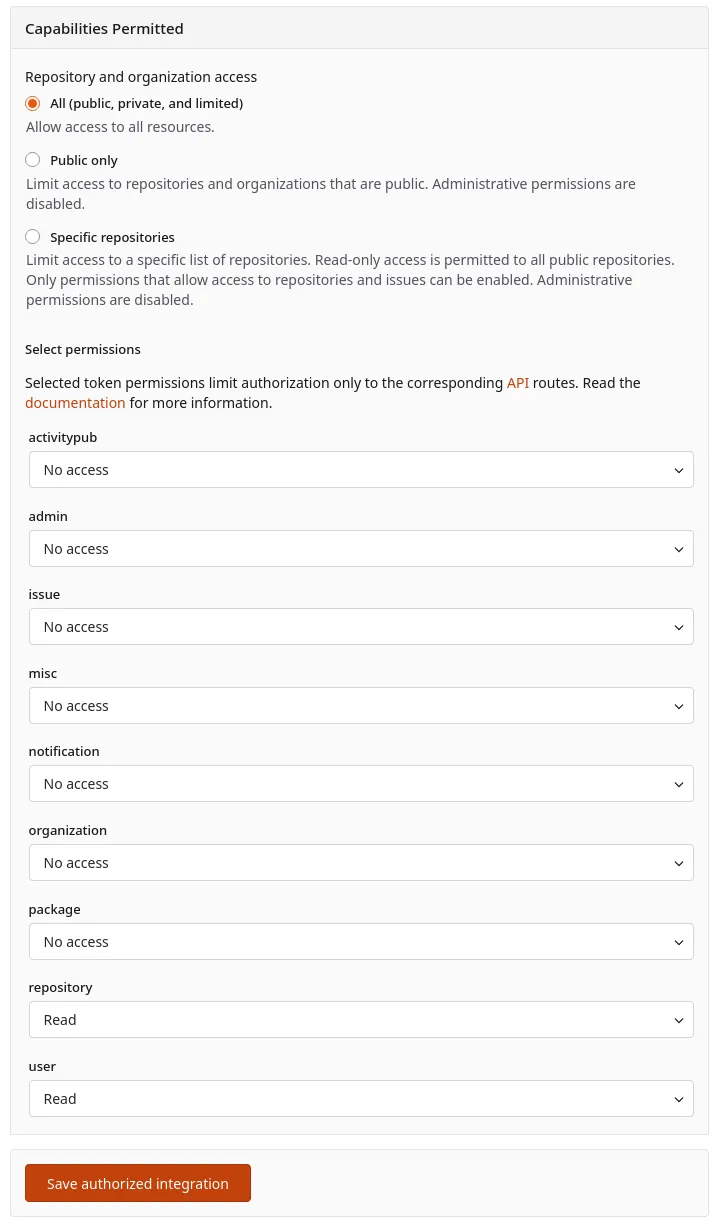
Capabilities Permitted
All Authorized Integrations have the same “Capabilities Permitted” section. This determines what permissions the Authorized Integration has, and which resources those permissions can be applied to. The permissions available are the same as those for access tokens, and are documented in the Access Token Scope page.
Technical Details
An external system that uses Forgejo’s Authorized Integrations must meet these system requirements:
- It must generate signed JWTs consistent with RFC 7519, at a minimum containing these claims:
issclaim: must be anhttps://-scheme URL representing the system that generated the JWT. Example:https://codeberg.org/api/actionsis the issuer for JWTs issued by Forgejo Actions running on Codeberg.audclaim: must contain a value generated by Forgejo when a new Authorized Integration is created.
- It must host authorization server metadata consistent with RFC 8414 Section 2 at
.well-known/openid-configurationunder the issuer URL, which contains anissuerfield, and a requiredjwks_urifield. - The authorization server metadata’s
jwks_urimust be an accessiblehttpsURL on the same host as the issuer which accesses an RFC 7517 JSON Web Key Set which contains the public key used to sign JWTs generated by this issuer.
When these requirements are met, an external system can access Forgejo with a JWT and Forgejo will perform this validation process:
- Provide the JWT to Forgejo in the
Authorizationheader.- As an HTTP Bearer Token, consistent with RFC 6750 section 2.1:
Authorization: Bearer eyJhb... - In the Authorization header in the format
Authorization: Token eyJhb..., an informal convention for token-based authentication that Forgejo supports.
- As an HTTP Bearer Token, consistent with RFC 6750 section 2.1:
- Forgejo will search for an Authorized Integration with the matching issuer (
issclaim) and audience (audclaim). If none are found, then the request will not be authenticated. - Forgejo will check the JWT against any configured claim rules in its Authorized Integration.
- Forgejo will fetch the
.well-known/openid-configurationmetadata from the issuer. - Forgejo will fetch the
jwks_uriURL from the metadata. - Forgejo will validate that the JWT is signed by an authorized signing key.
- The request will be authenticated as the user who owns the Authorized Integration, and authorized to perform actions within the permissions defined on the Authorized Integration.
Footnotes
-
If the Forgejo Actions (Local) options were not sufficient for a user, they could use the Generic JWT capability to write specific claim rules and use the
urn:forgejo:authorized-integrations:actionsissuer. For example, an additional claim rule could be defined onactorto permit only a single user’s workflows to access an Authorized Integration; this isn’t supported by Forgejo Actions (Local) due to its rarity, but can be implemented with a Generic JWT. The internal issuer name automatically refers to the current host, which allows it to: bypasses the HTTPS requirement for JWT validation, and continue to function if Forgejo’s hostname changes. ↩